 Voxel3D
VOXEL3D / 3D tools
3D Printing Cost Calculator
Estimate material, electricity, labor and machine costs, with a failure allowance and optional markup.
No sign-in needed- Material
- $1.00
- Electricity
- $0.12
- Labor
- $2.50
- Machine
- $2.00
- Failure allowance
- $0.62
These are estimates, not a print-service quote. Tax, shipping and finishing are not included. Markup is added to cost; it is not profit margin.
How the 3D printing cost calculator builds an estimate
A useful printing estimate begins with the job, not with a universal price per gram. Material consumption, time spent running the machine, hands-on work and the chance of a failed attempt describe different costs. This 3D printing cost calculator keeps those inputs separate so you can see which one is driving the result. The displayed figures are an estimate for your chosen assumptions, not a service quote, a local electricity tariff or a promise of profit.
Use the sliced job weight and duration when available. Include support material, brim, raft and purge material in the weight rather than measuring only the finished part. Use an average measured electrical draw for the job if you have one; a power supply rating is a capacity figure, not automatically the printer’s continuous consumption. Keep hands-on minutes separate from machine hours. A four-hour job might require only ten minutes of preparation, inspection and removal, while a short resin batch can require more handling.
Material, electricity and machine costs in plain units
Material cost is weight in grams divided by 1000, multiplied by your price per kilogram. Electricity cost is watts divided by 1000, multiplied by job hours and your price per kilowatt-hour. Labor is hands-on minutes divided by 60, multiplied by the hourly labor rate you choose. Machine cost is job hours multiplied by your own hourly allowance for equipment, maintenance and wear. Do not count the same electricity or labor expense again inside that machine allowance.
PLA and PETG spool prices vary by brand, refill versus spooled packaging, color, region, order quantity and promotions. Enter the delivered price from your own purchase rather than treating a web price as a stable market average. The reference links below provide current product listings you can compare with your invoice. For resin sold by volume, convert using the supplier’s density or use a measured mass; one litre must not be assumed to equal one kilogram. Wash liquids, gloves, curing and disposal are additional expenses you may need to budget outside this simple form.
Four worked 3D printing cost examples
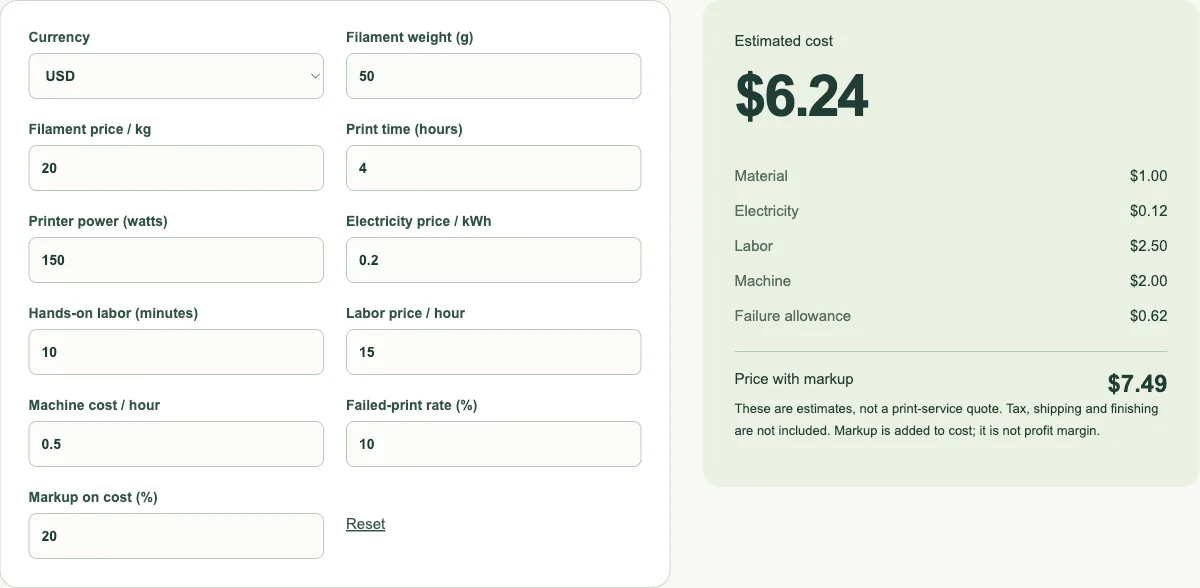
The following are reproducible arithmetic scenarios, not real customer orders or measured printer trials. They use USD only to make the calculations easy to compare. The small FDM example uses the form defaults: 50 g at $20/kg, four hours at 150 W and $0.20/kWh, ten labor minutes at $15/hour, and $0.50/hour for the machine. The base cost is $5.62. With a 10% failure rate it becomes $6.24, and a 20% cost markup produces $7.49 after rounding.
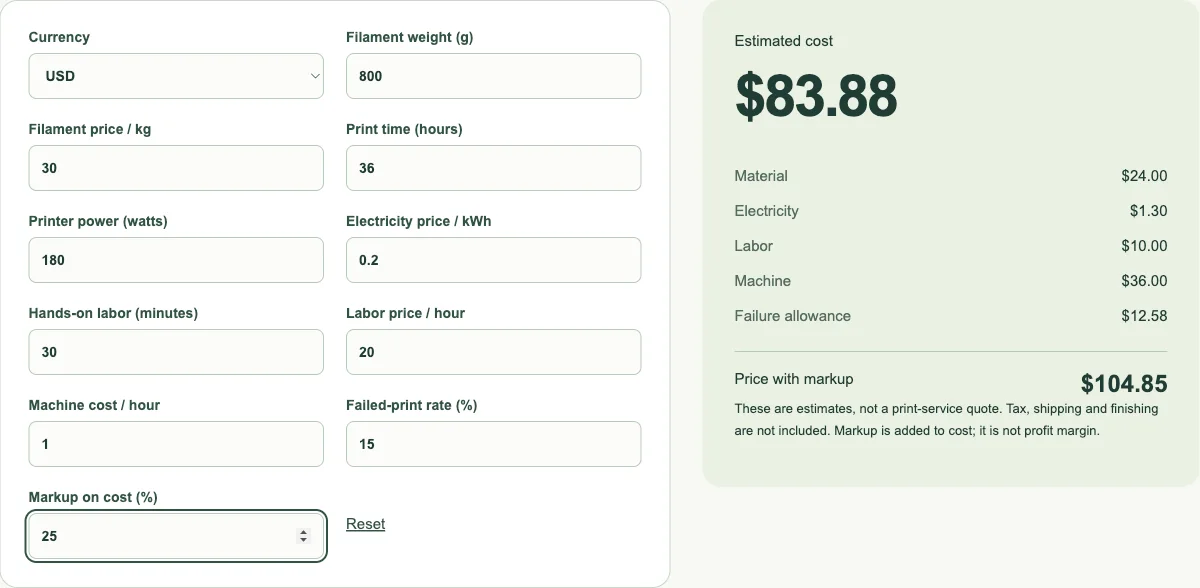
A larger FDM example uses 800 g at $30/kg, 36 hours at 180 W and $0.20/kWh, 30 labor minutes at $20/hour, and a $1/hour machine allowance. A resin scenario uses 80 g at $25/kg, three hours at 60 W and $0.20/kWh, 25 labor minutes at $18/hour, and $0.50/hour for the machine. Both examples use a 15% failure assumption and 25% markup. The resin row deliberately does not include washing or curing consumables, so it is an incomplete manufacturing quote until you add those costs.
For a small batch, use the actual combined sliced consumption instead of multiplying an arbitrary single-item estimate. Our batch scenario uses 64 g at $30/kg, four hours at 150 W, $0.20/kWh, 15 labor minutes at $18/hour and $0.50/hour for the machine, with 10% failure and 20% markup. Dividing the batch result by the number of usable pieces can help compare layouts, but only when preparation, failure behavior and delivered quantity are consistent.
| Job | Material / time | Cost per success | With markup |
|---|---|---|---|
| Small FDM | 50 g / 4 h | $6.24 | $7.49 |
| Large FDM | 800 g / 36 h | $83.88 | $104.85 |
| Resin (wash/cure excluded) | 80 g / 3 h | $12.98 | $16.23 |
| Small batch | 64 g / 4 h | $9.49 | $11.39 |
Why failed prints use cost divided by one minus the failure rate
A 10% failure rate is not the same as adding 10% to the cost. Under the simplified assumption that every attempt costs the same and succeeds with probability 0.9, producing one successful result takes an average of 1/0.9 attempts. A $5.62 attempt therefore corresponds to approximately $6.24 per success. The failure allowance in the breakdown is the difference between those values. At zero failure it disappears; a 100% failure input has no finite cost per successful result and is rejected.
Real failures are not always identical to full jobs. An early adhesion failure may waste little material, while a late failure can consume almost all of it. Batch failures can also affect several parts together. Use your own recorded results to choose a meaningful assumption and revisit it after changes in printer, material, design or operator. If your situation needs separate early-failure and late-failure costs, calculate those cases separately rather than presenting this one-rate approximation as a precise reliability model.
Cost markup is different from profit margin
The markup field adds a percentage of estimated cost. For a $10 cost and a 20% markup, the displayed price is $12. The resulting gross margin on that selling price is $2 divided by $12, or about 16.7%, before any omitted costs. A target 20% gross margin would instead imply dividing the cost by 0.8. These two percentages use different denominators, so substituting one for the other can make a small job appear more profitable than it is.
Treat the calculated price as one input to a quoting decision. Taxes, payment processing, packaging, shipping, design work, revisions, finishing and customer support can change what you need to charge. A job may also have a minimum handling cost that dominates its material price. The currency selector changes the unit used to display your entered monetary values; it is not a foreign-exchange converter. If you switch currency, enter all money inputs consistently in that currency rather than assuming an exchange rate was applied.
Make the calculator match your printing records
Save the slicer estimate, chosen inputs and final result with the job. After a completed print, compare estimated and actual consumption, note whether supports or purge were omitted, and record the hands-on time. For resin work, track washing and curing separately until you have a defensible way to include them. For long FDM jobs, compare the assumed electrical draw with a safe, suitable energy measurement rather than relying only on the machine’s label.
Rounding belongs at the display stage. The calculator retains the underlying arithmetic while showing currency-appropriate amounts, so adding individually rounded rows by hand can differ slightly from the displayed total. If a result seems unexpectedly low, inspect the units first: grams versus kilograms, watts versus kilowatts, and minutes versus hours are common sources of a thousandfold or sixtyfold error. The purpose of the breakdown is to expose those assumptions before you use the estimate in a real decision.
References
3D Printing Cost Calculator · Frequently asked questions
Can I use this without an account?
Yes. These tools run without sign-in, credit purchases or model-generation requests.
Failure allowance?
Failed-print allowance assumes each attempt has the same cost: total cost ÷ (1 − failure rate). Actual failures may consume less time or material.